
If you have ever run a few simulations and thought, “this roster is fun, but I want the log to feel more like our own inside jokes, OCs, classroom cast, or fandom canon,” custom events are the feature you have been waiting for. Instead of relying only on the default event pool, you can now build your own event library and shape the tone of the entire simulation.
That means you are not just customizing who enters the arena. You are also customizing what can happen once the Games begin: quiet survival scenes, betrayals, resource discoveries, dramatic feast moments, and even full arena twists.
What Custom Events Actually Change
In the default simulator, the tribute roster already gives you a lot of variety. But custom events change something even more important: the writing voice of the simulation. They let you decide what kinds of moments are possible, what tone the event log has, and how often your run feels funny, dark, chaotic, or story-driven.
This is especially useful if you are building a themed roster. Maybe you are simulating a class group, a Discord server, your own original characters, or a crossover cast from several series. Default events can still work, but custom events make the output feel like it belongs to your version of the game rather than a generic event pool.
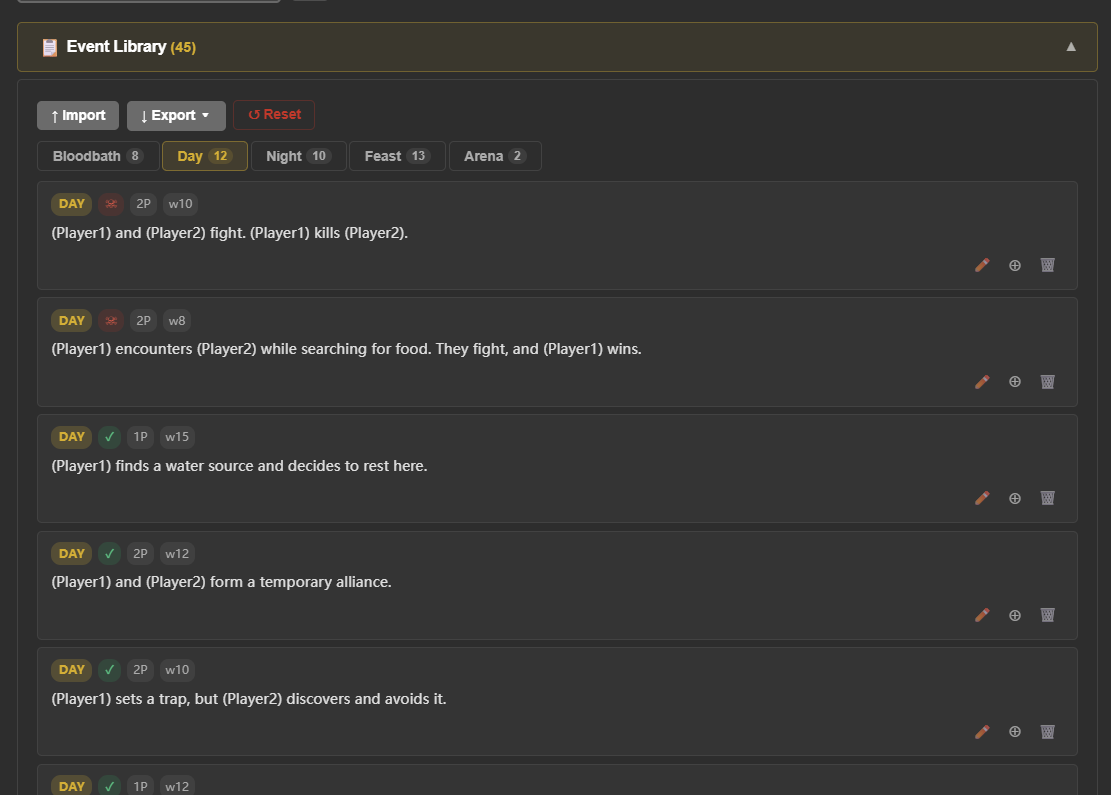
The Four Event Types You Can Customize
A good custom event library does not only focus on one phase. The best results usually come from spreading your writing across the major parts of a run so the pacing still feels natural.
Day Events
Day events are where a lot of the simulator's personality lives. These are great for scouting, alliances, supplies, close calls, accidental disasters, or quiet moments that give your tributes more character between fights.
Night Events
Night events are perfect for paranoia, regrouping, confession-style moments, sabotage, fear, and ambushes. If you want the log to feel more emotional or tense, this is usually the easiest place to start.
Feast Events
Feast events work best when you want high-stakes confrontation. They should feel sharper and more urgent than normal day events, because players already read feast rounds as risky turning points.
Arena Events
Arena events are the big spectacle moments. Think weather disasters, environmental traps, collapses, fire, creatures, toxic fog, or any special twist that changes the whole mood of the simulation. Because arena events are so noticeable, they work best when you reserve them for your most memorable ideas.
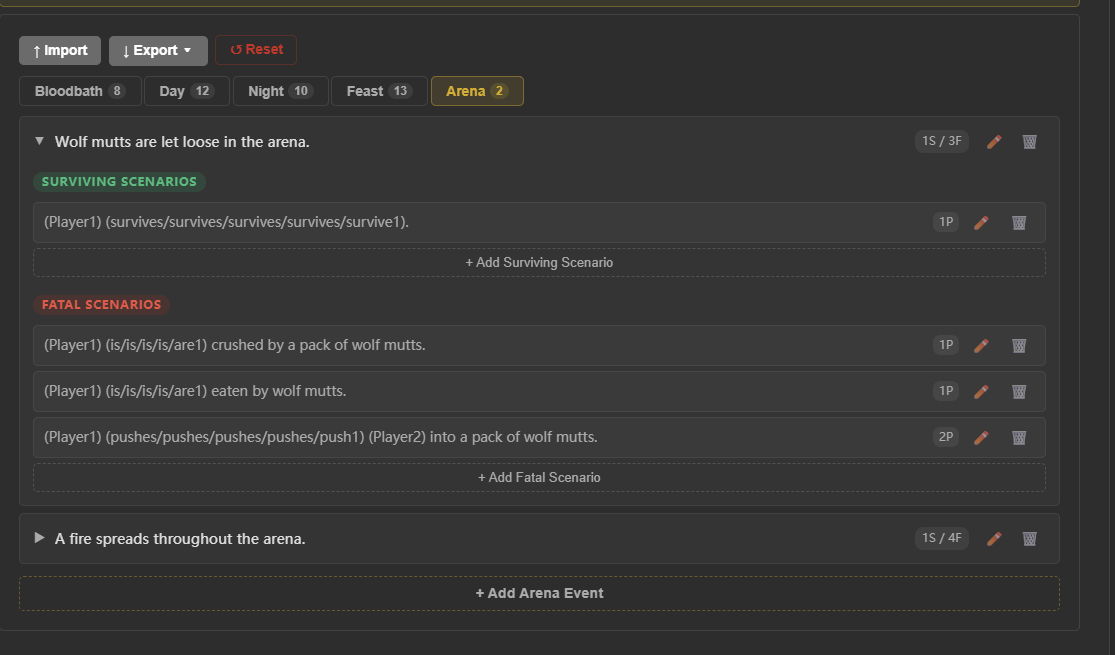
How to Write Better Custom Event Text
The easiest mistake is writing events that all sound the same. If every custom line is just one tribute attacking another tribute, your event library becomes repetitive very quickly. Try to mix direct conflict with survival scenes, strange discoveries, reversals, and character-driven moments.
- Use clear, readable sentences that still sound like a story.
- Mix fatal and non-fatal outcomes so the pacing does not become predictable.
- Let some events reveal personality instead of only deciding who dies.
- Keep arena events broader and more cinematic than standard encounters.
- Test whether a line is still fun after reading it five or ten times.
Importing and Exporting Event Libraries
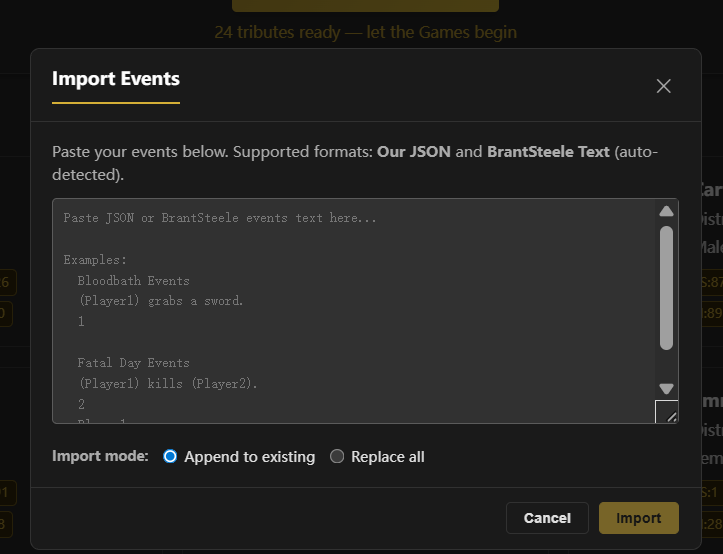
One of the most useful parts of the feature is that you are not limited to writing a single set of events and leaving it there forever. You can build multiple custom event libraries for different moods, different friend groups, or different challenge formats, then import and export them as needed.
This makes the simulator much more replayable. Instead of reusing one giant mixed pool, you can keep separate libraries for comedy runs, serious survival stories, fandom crossovers, classroom events, or tournament-specific scenarios.
How to Keep Custom Events Balanced
Good custom events are not only interesting — they are also balanced enough that the run still feels fair. If every custom event is fatal, the simulation becomes a speedrun. If none of them are dangerous, your roster stalls for too long and the story loses momentum.
A good rule of thumb is to start small. Add a handful of day events, a few night events, one or two feast events, and one or two arena twists. Run several simulations with the same roster and see how the pacing changes before you expand the library.
Best Use Cases for Custom Events
- Friend group simulations: turn private jokes into event text.
- Classroom activities: create school-safe themed events for engagement.
- Original character projects: give your cast a more specific narrative voice.
- Fandom crossovers: make the event log match the world and tone you want.
- Challenge mode: build libraries that reward a certain play style or theme.
Start Small, Then Refine
You do not need to write fifty custom events on day one. In fact, you will usually get better results by starting with a compact set of your best ideas, testing them, then expanding based on what feels fun to reread. The best event library is not the biggest one — it is the one that makes your simulation feel distinct every time it appears.
If your goal is to make the Hunger Games Simulator feel more personal, more replayable, and more like your own version of the arena, custom events are one of the highest-impact features you can use.
Related Custom Event Resources
- Hunger Games Simulator custom events for a focused overview of event types, writing tips, and event library setup.
- Hunger Games event ideas for copyable day, night, feast, and arena prompts.